Build-to-rent is a different beast from standard residential development, and anyone who’s worked across both sectors knows it. The decision-makers aren’t owner-occupiers comparing kitchen finishes — they’re investors assessing portfolio performance and lettings agents trying to figure out how quickly they can fill 80 or 120 units. When it comes to 3D floor plans for build-to-rent developments, what investors and lettings agents need to see before launch is fundamentally different from what a traditional housebuilder puts in a brochure. The floor plan isn’t just a layout reference. It’s a due diligence document. It tells a story about yield, about tenant flow, about how the building will actually function at scale — and if it doesn’t tell that story clearly, it creates friction at every stage from investor sign-off to tenancy agreement.
We work with developers and agents across the UK, Europe, and beyond, and the build-to-rent briefs that come into our studio are consistently more demanding than single-unit residential. There’s more to communicate, more stakeholders to satisfy, and the visualisation assets need to work across multiple contexts — investment decks, lettings portals, management handbooks, and physical marketing suites. A 2D CAD plan isn’t going to cut it for any of those audiences. If you’re still on the fence about the difference, it’s worth reading our piece on 3d floor plans vs 2d cad drawings what homebuyers and investors actually respond to — the gap in comprehension between the two formats is significant, especially for non-technical audiences.
So let’s get into exactly what build-to-rent stakeholders are looking for, what a well-produced floor plan package should contain, and where most developers go wrong when they try to cut corners at the pre-launch stage.
Why 3D Floor Plans for Build-to-Rent Developments: What Investors and Lettings Agents Need to See Before Launch Differs From Standard Residential
In a standard for-sale residential development, the floor plan serves one main purpose: help the buyer picture their furniture in the space. That’s a relatively low bar. For build-to-rent, the floor plan has to do much more work simultaneously.
Investors need to understand unit mix at a glance. How many studio, one-bed, two-bed, and three-bed units are there? How does the layout affect rental pricing tiers? Where are the amenity spaces — the gym, the co-working lounge, the bike storage — and do they feel like genuine selling points or afterthoughts squeezed into leftover square footage? These aren’t aesthetic questions. They’re financial ones.
Lettings agents have a different but equally specific set of concerns. They want to be able to answer prospective tenants’ questions without scheduling a viewing first. That means the floor plan has to communicate natural light (window placement matters), storage (where is it?), and practical flow — can you move a sofa through that hallway? Is the kitchen an island or galley? Is there a separate bath and shower? A 3D rendered floor plan that shows furniture, finishes, and spatial depth answers those questions visually in seconds.
There’s also a broader audience problem. Build-to-rent investment decks go to asset managers, institutional funders, and international investors who may never physically visit the site before committing. A flat CAD plan gives them very little to work with. A fully rendered, annotated 3D floor plan positions you as a serious operator.
What a Professional 3D Floor Plan Package Should Include
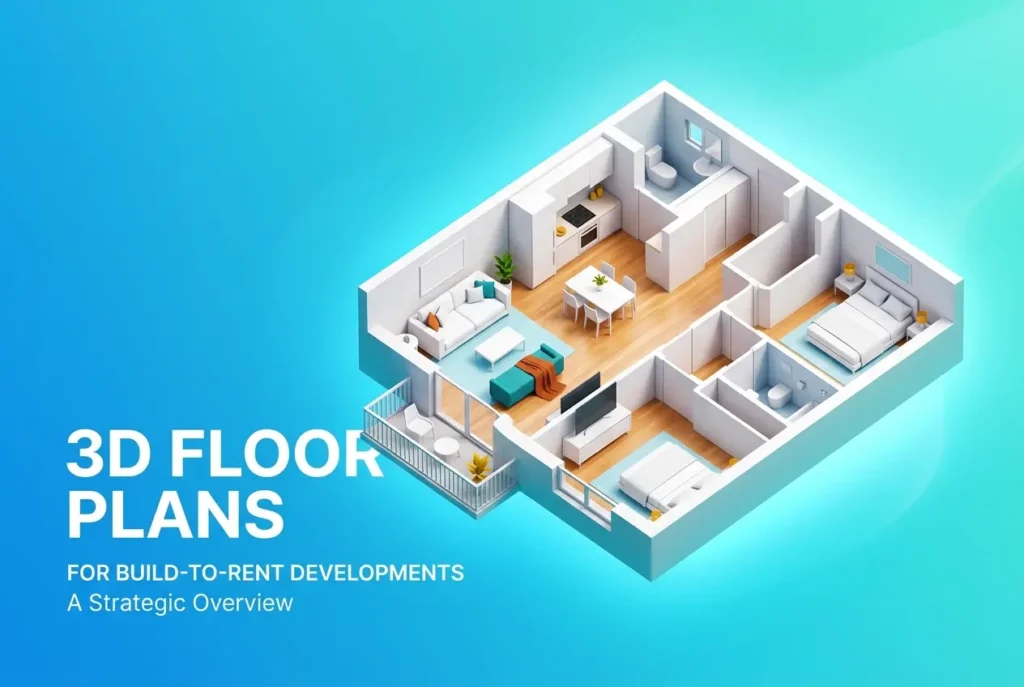
This is where we get specific, because “3D floor plan” is a term that gets used loosely. A basic axonometric view of a unit is a start. A proper pre-launch package for a build-to-rent development is considerably more than that.
Unit-Level Plans With Furniture and Finishes
Every distinct unit type needs its own rendered floor plan. Not a generic template — an actual representation of that unit’s dimensions, windows, built-in storage, kitchen configuration, and bathroom position. We include furniture at scale because it immediately communicates whether the living area fits a proper sofa or whether it’s a squeeze. Material finishes should be visible in the render — flooring type, kitchen worktop tone, and wall colour palette all contribute to the perceived quality of the unit before a tenant has ever walked through the door.
Building-Wide Floor Plates
Investors in particular want to see the whole floor plate, not just individual units. This shows unit mix per floor, corridor widths, lift and stairwell positions, and how amenity space is distributed across the building. For multi-storey BTR schemes, we typically produce a rendered floor plate for every distinct level — ground floor with entrance lobby, amenity levels, a standard residential floor, and any rooftop or top-floor variations.
Amenity Space Plans
This is one of the most overlooked elements in BTR floor plan packages, and it’s a mistake. The gym, co-working hub, concierge area, and shared lounge are core to the BTR value proposition. They need to be rendered with the same quality as the residential units, with furniture placed realistically and finishes shown clearly. An investor trying to assess whether the amenity offering justifies the premium rental position can’t make that assessment from a blank floor plate with labels.
Orientation and Aspect Indicators
North arrow, floor level, and unit number or reference should be embedded into every plan. Views matter in lettings — a south-facing two-bed commands a different rent than a north-facing one. If your floor plans don’t communicate this clearly, agents are left guessing and investors are left with incomplete information.
Colour Coding, Annotations, and the Language of Investment Decks

One thing we’ve learned producing floor plans specifically for institutional investment audiences is that the visual language needs to align with how financial documents are structured. That means clear colour coding for unit types, consistent graphic treatment across all plans in the package, and annotations that use the same terminology as the rest of the deck.
If the investment report refers to “Type A Studio” and “Type B1 One-Bedroom,” every corresponding floor plan should carry exactly those labels. Inconsistency between the written report and the visual assets creates doubt — investors notice it, and it makes a development look less professionally prepared than it is.
We also strongly recommend producing plans at two levels of detail: a simplified version for headline slides (clean, uncluttered, easy to read at a glance) and a detailed version for the appendix or due diligence pack (fully dimensioned, annotated with storage areas, utility cupboards, and m² per room). Both serve a purpose. One communicates, the other documents.
When to Add 360 Virtual Tours and Interior Renders to the Package
Floor plans are the foundation, but they have limits. They show layout, not atmosphere. For a pre-launch BTR scheme where show apartments may not be ready, pairing your floor plan package with photorealistic interior renders and a 3d 360 virtual tour rendering is increasingly standard practice rather than a premium add-on.
Virtual tours in particular are valuable for BTR because the same asset serves multiple stages: investor meetings, agent training sessions, and eventually tenant acquisition once the building is live. We’ve written more about this decision in our comparison of 360 virtual tour rendering vs matterport scans which works better for offplan property sales — for off-plan BTR, the rendered virtual tour wins every time because you’re selling something that doesn’t physically exist yet.
Interior renders of the show unit types and amenity spaces complement the floor plans by providing emotional context. A rendered floor plan tells you the living room is 18m². A matching interior render shows you what 18m² feels like when it’s well-lit, well-furnished, and finished in the specified material palette. That combination — plan plus render — is what converts interest into commitment, whether the audience is a fund manager or a prospective tenant.
What Developers Get Wrong: Common Mistakes Before Launch

The most frequent mistake we see is treating the floor plan package as a box-ticking exercise rather than a strategic asset. A developer will commission beautiful exterior CGIs and a polished investment brochure, then send over a basic 2D CAD export for the floor plan pages. It looks like an afterthought — because it is one — and it undermines the credibility of everything else in the pack.
The second common error is producing floor plans only for the “hero” unit types and leaving the rest undocumented. In a 120-unit BTR scheme, an investor will want to see every distinct unit configuration. If you only show the two-bed, they’ll ask questions about the studios and one-beds. Have the answers ready in visual form.
Third: ignoring amenity space entirely. This is particularly painful because amenity is where BTR differentiates itself from conventional PRS. If your gym plan is a CAD rectangle with the word “GYM” in it, you’ve missed an opportunity to demonstrate that this is a properly managed, professionally designed development.
It’s also worth noting that floor plan production doesn’t exist in a vacuum. It sits within a broader visualisation strategy that includes exterior renders, interior CGIs, and potentially animation. Coordinating all of these assets from a single studio — one that understands the full context of the project — produces more consistent results than assembling assets from multiple sources. We covered a similar point about how how architects use 3d interior renderings to reduce client change requests during the design stage, and the principle applies equally here: visual consistency early in the process saves time and money later.
Practical Checklist: BTR Floor Plan Package Before Launch
| Asset | Primary Audience | Priority |
|---|---|---|
| 3D rendered unit floor plans (all types) | Investors, lettings agents, tenants | Essential |
| Building floor plates per level | Investors, asset managers | Essential |
| Amenity space rendered plans | Investors, lettings agents | Essential |
| Interior CGIs per unit type | All stakeholders | Strongly recommended |
| 360 virtual tour (show unit) | Lettings agents, prospective tenants | Strongly recommended |
| Simplified plan versions for decks | Investors, presentations | Recommended |
| Detailed dimensioned plans for DD | Asset managers, legal teams | Recommended |
Getting the Brief Right Before You Start
One thing that derails BTR floor plan projects more than anything else is an incomplete brief. We need to know unit mix and typology references, your material specification (even a preliminary palette), the intended audience for each asset, and whether plans will be used digitally, in print, or both. Output resolution, colour profile, and file format all change depending on use. A plan that looks great on screen may print poorly in a brochure if it wasn’t set up for CMYK at 300dpi from the start. If you’re unsure how to structure a brief for a project like this, our guide on how to brief a 3d rendering studio what architects and developers need to prepare before project kickoff covers exactly what we need to get started efficiently.
Timeline is also a real consideration. A full BTR floor plan package — covering all unit types, floor plates, and amenity spaces — takes time to produce properly. Rushed floor plans look rushed, and that affects the credibility of your launch materials. Plan for this early in your pre-launch schedule, not as an afterthought in the final two weeks.
If your build-to-rent scheme is heading toward investor presentations or pre-launch lettings activity and you need a floor plan package that actually does the job, get in touch with our team at contact us. We work with developers and agents across the BTR sector and understand what these assets need to communicate — and to whom. You can also explore our full 3d floor plan rendering service to see the range of formats and outputs we produce for development projects of all scales.
Frequently Asked Questions
What should a 3D floor plan include for a build-to-rent development to attract investors?
A 3D floor plan for a build-to-rent development should include accurate room dimensions, furniture placement to demonstrate livability, and realistic material finishes that reflect the actual specification. Investors also need to see shared amenity spaces, unit mix layouts, and clearly labeled entry points to assess operational flow and rental yield potential. Including multiple unit types within one presentation pack helps investors compare configurations quickly without needing site visits.
How do 3D floor plans help lettings agents market build-to-rent apartments before the development is complete?
3D floor plans allow lettings agents to market apartments off-plan by giving prospective tenants a realistic and spatially accurate view of the home before it is built. They reduce uncertainty by showing exactly how furniture fits within the space, which is one of the most common concerns renters have when viewing a floor plan alone. This leads to faster pre-letting conversions and reduces void periods at launch, which directly benefits both the developer and the investor.
What is the difference between a 2D and 3D floor plan for build-to-rent marketing purposes?
A 2D floor plan shows the layout from a top-down perspective with measurements but offers no visual context about how the space actually feels to live in. A 3D floor plan adds depth, furniture, lighting, textures, and finishes, making it far easier for tenants and investors to emotionally connect with the unit before viewing it in person. For build-to-rent developments where volume lettings and investor confidence are critical, the added engagement from 3D visuals consistently outperforms 2D-only presentations.
When in the build-to-rent development timeline should 3D floor plans be created?
3D floor plans should ideally be created during the pre-construction or planning approval stage so they can support early investor presentations, planning applications, and off-plan lettings campaigns. Having them ready at least three to six months before practical completion gives lettings agents enough runway to build a waiting list and secure tenancy agreements ahead of handover. Early production also allows for revisions if the specification or layout changes during the build process.
How much do 3D floor plans cost for a build-to-rent development and is it worth the investment?
The cost of 3D floor plans for a build-to-rent development typically ranges from £150 to £500 per unit depending on complexity, level of detail, and whether bespoke furniture and finishes are rendered. For a development of 50 or more units, bulk packages from specialist CGI studios can significantly reduce the per-unit cost. Given that a single void month on even a modest unit can cost more than the entire floor plan fee, the return on investment is almost always justified by faster lettings and stronger investor confidence at launch.