Here’s a scene we see at least once a month: a client sends us a landscape plan, we build the render, and the first feedback is “the trees look too small.” Then, two weeks later, the same client asks why the planting looks fake. Both comments come from the same problem. Vegetation in architectural visuals has to answer a question most people never state out loud: what year are we showing? This guide on how to render realistic landscaping and vegetation in architectural visuals, covering seasonal accuracy, plant species and tree maturity at Year 1 versus Year 10, explains how we make those decisions and why they matter for approvals, marketing and trust.
Plants are the least forgiving part of any scene. Viewers can’t always tell why a brick facade looks slightly off, but they recognise a wrong tree immediately. A palm in a temperate-climate courtyard, a fully leafed oak in a winter scene, a 10-metre tree on a day-one handover image: each one breaks the illusion and, worse, the credibility of the whole project.
So we treat vegetation as a design and technical discipline, not decoration dropped in at the end. Species, age, season, soil conditions and maintenance all shape what ends up on screen.
Start With the Site, Not the Plant Library
Before we open an asset library, we ask where the project is. Climate zone, latitude, soil, rainfall and local planning requirements decide which plants are even plausible. A landscape architect’s planting schedule is the best starting point, and we follow it closely. When there isn’t one, we research regionally appropriate species instead of defaulting to generic “green stuff.”
Generic vegetation is the most common giveaway of a weak render. Stock trees tend to be the same handful of round-canopied, mid-green forms. Real sites have texture variety: fine-leaved grasses against broad-leaved shrubs, upright forms against spreading ones, and different greens across species.
We think about vegetation in layers:
- Canopy trees that define scale and skyline.
- Understory trees and large shrubs that frame views and soften architecture.
- Groundcover, perennials and grasses that fill the lower plane.
- Surface details like leaf litter, mulch, gravel, moss on stone and edge conditions where lawn meets paving.
Skipping any layer makes the scene feel staged. Real gardens are messy at the edges, and that mess is what sells realism.
Seasonal Accuracy: What Changes and What Clients Forget
Season affects far more than leaf colour. When we build a spring, summer, autumn or winter scene, we adjust the whole image.
Foliage and Plant Behaviour
Deciduous trees in early spring have partial, light-green leaf emergence and a visible branch structure. In summer the canopy is dense and casts deeper shade. Autumn brings colour variation that differs by species, with some turning yellow, others red, and some simply browning. Winter exposes the skeleton of the tree, and that changes the whole feel of the image because light reaches the ground and building facades differently.
Evergreens stay constant in structure, but their tone shifts slightly with light and weather. Ornamental grasses go golden and dry in autumn and winter. Perennials die back. If the render shows peonies, hydrangeas and tulips all flowering together, any gardener will spot it as impossible, because they bloom at different times.
Everything Else Must Match
The sky, sun angle, shadow length, ground wetness, clothing on people and even the colour temperature of the light need to agree with the vegetation. A bare winter tree under a high summer sun is a classic mismatch. Low winter sun creates long, soft shadows and warm side-lighting, while summer noon is harsh and top-down. We plan the lighting and the planting together, and we’d urge you to brief them together too.
For marketing, many clients prefer a late-spring or early-summer look: fresh, green, flowering. That’s a legitimate choice as long as it’s consistent. Problems arise when one hero image shows lush summer and another shows bare winter branches with no explanation.
Tree Maturity: Year 1 vs Year 10
This is where the most expensive misunderstandings happen. Trees take time, and a render that ignores that is making a promise the site can’t keep.
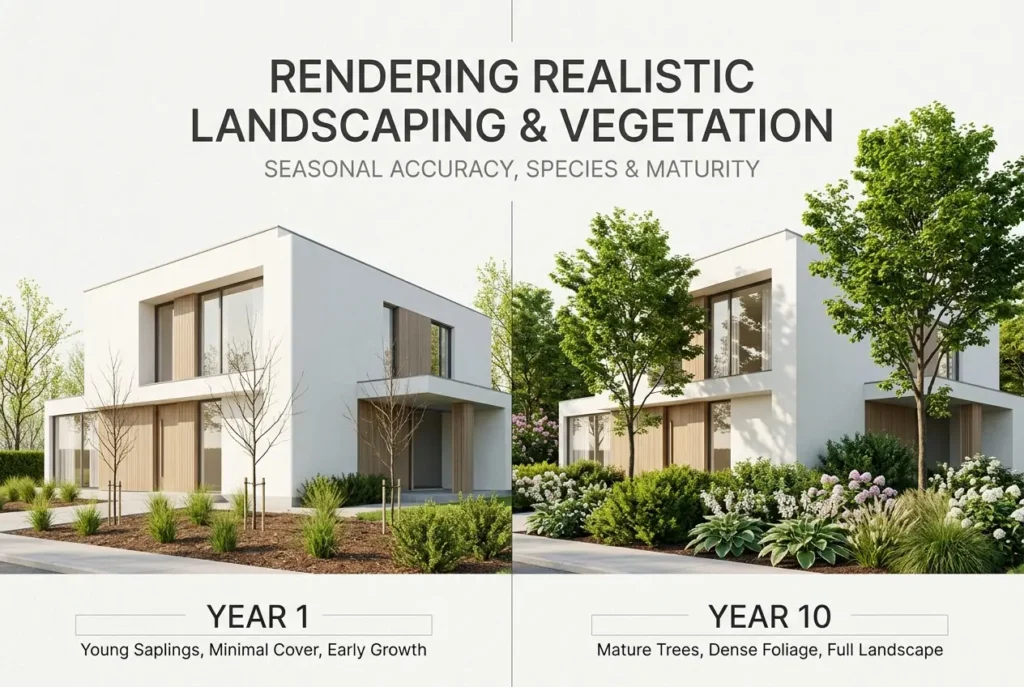
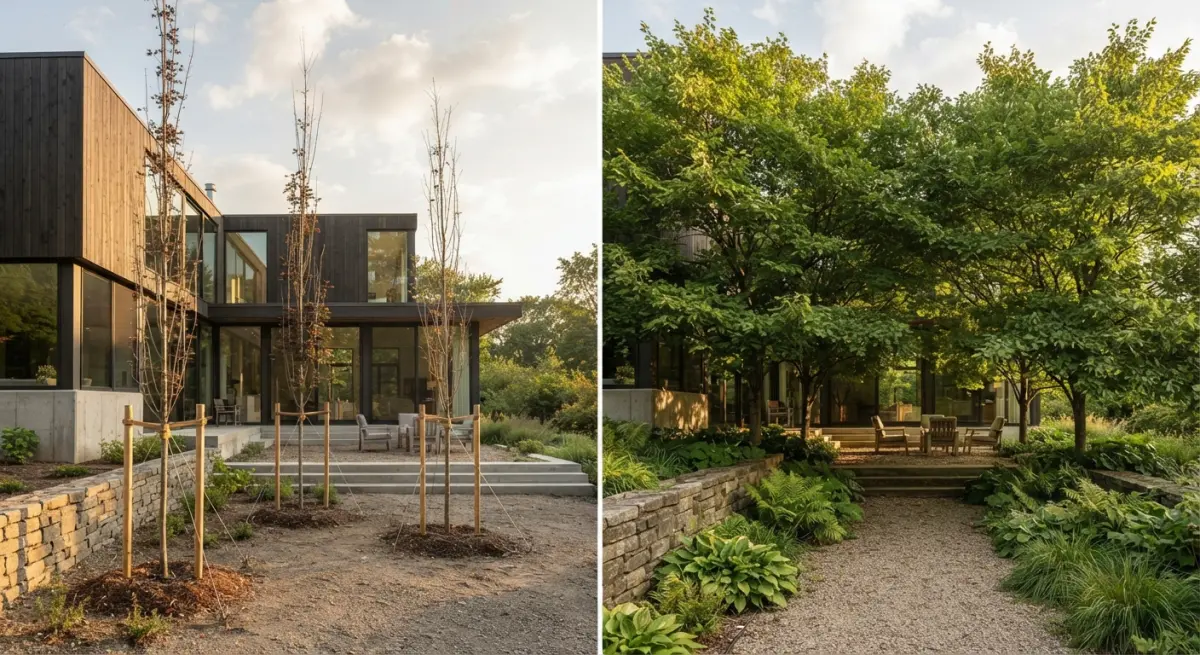
Year 1 (Handover Condition)
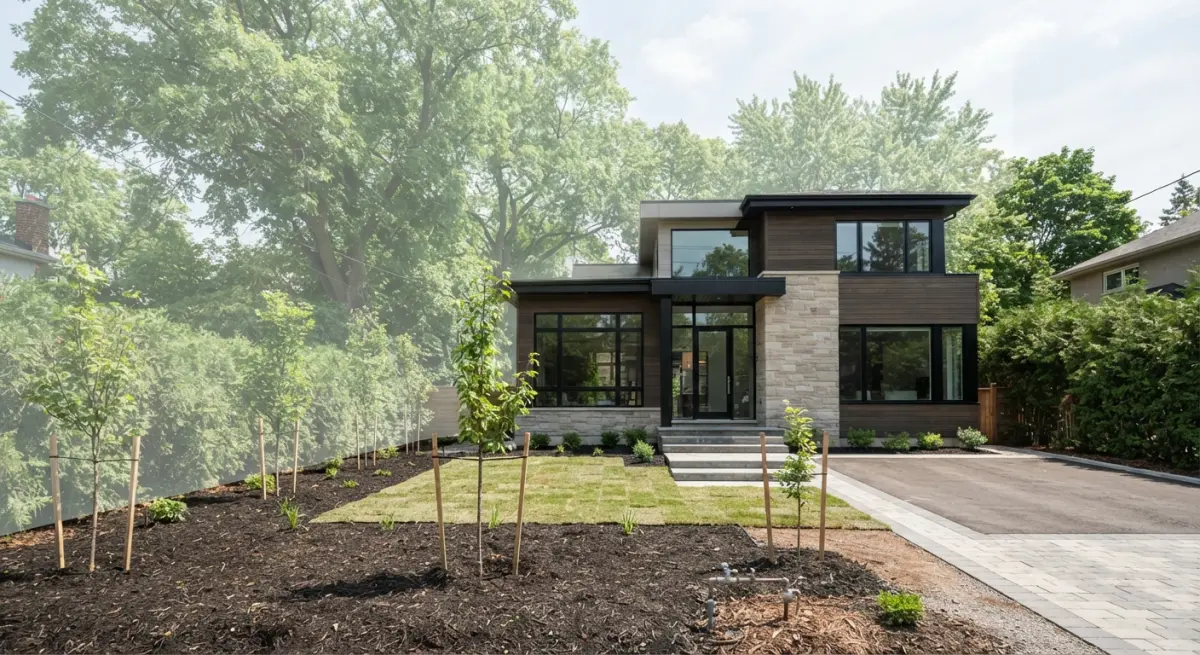
At handover, trees are whatever size the contractor actually plants. That is usually nursery stock: thin trunks, often staked, with small, sometimes sparse canopies and visible planting pits or mulch rings. Shrubs are spaced out with bare soil between them because they haven’t yet spread. Lawn may be fresh turf with visible seams. Climbers haven’t reached the top of the trellis.
This image is honest, and planning authorities often want it. It shows what the building will genuinely look like on opening day. It can look sparse, which is why many clients resist it, but it’s the version most likely to match reality.
Year 10 (Established Condition)
By year ten, the picture changes substantially, but how much depends entirely on species. Fast growers like some willows, poplars or birches may be large, while slow growers such as oak, beech or many conifers will still be young. This is where a species-by-species approach beats a blanket “scale everything up” approach. We research expected growth habits and adjust height, trunk thickness, canopy spread and density individually.
Shrubs knit together and cover the soil. Groundcover fills in. Climbers cover walls. Canopy shade begins to alter the light on the building and the ground, and lawns under dense trees may thin out. Trunk bark develops texture and character. Overall the scene looks softer, and the architecture sits within the landscape instead of in front of it.
Comparison at a Glance
| Element | Year 1 | Year 10 |
|---|---|---|
| Trees | Nursery-size, thin trunks, stakes, small canopy | Species-dependent; fuller canopy, thicker trunks, defined form |
| Shrubs | Spaced apart, bare soil visible | Merged masses, soil hidden |
| Lawn and groundcover | Fresh turf, visible seams, patchy cover | Even, established, thinner under shade |
| Climbers and hedges | Partial coverage, young growth | Full coverage, softened architecture edges |
| Shadows | Mostly building-driven | Mixed canopy and building shade |
How We Build Realistic Vegetation Technically
On the production side, a few practices make the biggest difference.
- Use real species models, not one-size-fits-all. We choose or build trees and plants that match the specified species, then vary them. Copy-pasting one tree twenty times gives obvious repetition.
- Scatter with intention. Scattering tools help with grass, groundcover and gravel, but we paint density by hand around edges, paths and building bases, where real plants behave differently from open areas.
- Control leaf translucency. Sunlight passing through leaves gives foliage its glow. Without proper translucency, canopy looks heavy and plastic.
- Vary scale and rotation. Even within a single species, individuals differ in height, lean and fullness.
- Add imperfections. A few yellowing leaves, some uneven growth, a fallen branch or leaf litter at the base bring believability.
- Watch distance. Foreground plants need full detail, midground can be simplified, and distant trees can be lighter. Matching detail to camera distance keeps render times sensible.
Our post on 3D exterior rendering covers how landscape fits into the broader exterior workflow, including camera, light and context.
What Clients Get Wrong
After many projects, the same misunderstandings keep appearing.
Showing mature trees on a day-one image. It’s tempting, but if the site will have saplings, mature trees mislead buyers and can cause trouble with planners or stakeholders later. If you want to show the future, label it as the Year 10 view and, ideally, show both.
Over-planting. Clients often ask for more trees, more flowers and more colour. Real planting schemes have restraint, with repeated species and clear structure. A cluttered scene looks like a garden centre.
Ignoring tree size relative to the building. Large trees too close to a facade will block light, windows and views. Rendering the Year 10 condition often reveals planting conflicts the plan didn’t show, which is a useful benefit.
Mixing climates. Palms, olive trees and birches in one scene may look pleasant, but it’s rarely believable for any single location.
Treating vegetation as a final polish. If planting arrives late, the composition, shadows and camera angles are already locked. Share landscape drawings early.
Our Recommended Approach for Planning and Marketing
For projects where planning approval matters, we usually suggest a Year 1 view for honesty and a Year 10 view to show intent. For sales and marketing, a Year 5 to Year 10 image paired with a handover image gives buyers a realistic sense of how the place will mature. Where seasonal marketing is relevant, a summer and a winter image of the same view can show the design holds up all year, not just in June.
This also applies to 3D architectural rendering projects where landscape forms part of the building’s identity, such as courtyards, green roofs, and residential developments with shared gardens.
Wrapping Up
Knowing how to render realistic landscaping and vegetation in architectural visuals comes down to a handful of honest questions: where is the site, what season is it, which species are planted, and how old are they? Answer those, and the render stops being a pretty picture and becomes a credible preview of the project.
If you have a landscape plan and want to see how your project looks at handover and at maturity, get in touch with our team. Send us the planting schedule and location, and we’ll tell you what’s realistic before we render a single leaf.
Frequently Asked Questions
How do I make trees in an architectural render look realistic at both Year 1 and Year 10 growth stages?
Build separate scene variants using species-specific growth data from nurseries or arborist references, scaling height, canopy spread, and trunk caliper to match each stage. At Year 1, show newly planted specimens at nursery size (often 2-4 inches caliper) with visible stakes, mulch rings, and sparse canopies, while Year 10 should show filled-out crowns, thicker trunks, and canopy shadows that soften the building facade. Vary individual tree proportions slightly so the planting doesn't look cloned.
How can I ensure seasonal accuracy when rendering vegetation for a specific project location and date?
Match foliage color, density, and flowering to the climate zone and month of the render, such as bare deciduous branches in winter, fresh yellow-green leaves in spring, and amber or red tones in autumn. Pair this with appropriate sun angle, sky conditions, and ground cover like leaf litter or snow. Also check that the plant palette includes evergreen and seasonal species typical for the region so the scene doesn't contradict local conditions.
What plant species should I choose for realistic landscaping in architectural visualization for different climate zones?
Use the USDA hardiness zone (or Köppen climate classification) and the landscape architect's planting schedule to select native or regionally adapted species, such as Mediterranean olive and lavender for dry climates or maples, birch, and ferns for temperate ones. Avoid mixing species that wouldn't coexist naturally, like tropical palms next to conifers in a cold climate. Asset libraries such as Laubwerk, Forest Pack, or Quixel Megascans offer species-accurate models you can match to the planting plan.
How do I show the difference between newly installed landscaping and mature planting in client presentations?
Present side-by-side or sequential images (Day 1, Year 1, Year 5, Year 10) from the same camera angle with identical lighting so clients can clearly see how the landscape evolves. For installation-stage images, include bare soil patches, smaller plant sizes, and wider spacing, then progressively fill gaps and increase canopy coverage in later versions. This sets realistic expectations about privacy screening, shade, and how the architecture will be framed over time.
What are the most common mistakes that make rendered landscaping look fake, and how can I avoid them?
Common errors include oversized mature trees on a new build, perfectly uniform lawns, repeated identical plant models, and lush summer foliage in winter scenes. Avoid them by randomizing scale, rotation, and color variation with scattering tools, adding imperfections like uneven grass height, fallen leaves, and weeds in beds, and using accurate subsurface scattering for leaves. Always cross-check the final render against reference photos of similar sites and plantings.